Overview of Product dependencies in initial Release Testing
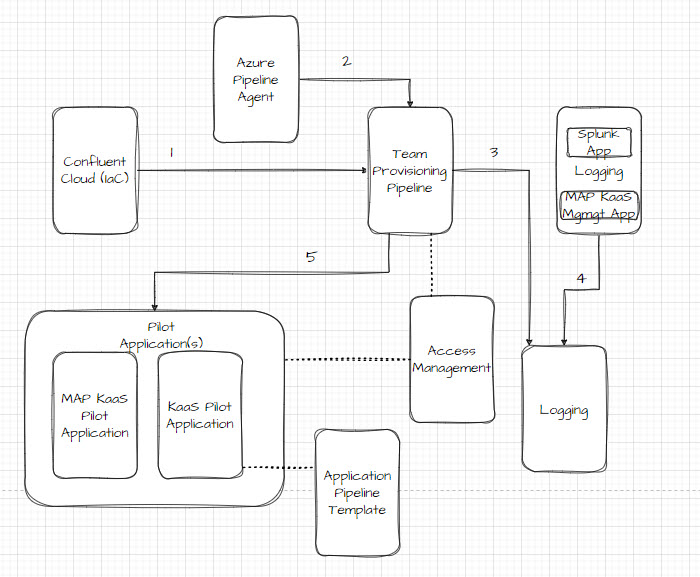
Above image illustrates the dependencies between the different Products within KaaS 1. Kafka Clusters are created as a container for topics and access management. (initially 1 per environment) 2. Azure Pipeline Agent in a non-persistent agent service that is part of Team Provisioning Pipeline (TPP) and Application Pipeline Template. It is created by its own pipeline within the other pipelines and the creation can be verified in ADO Agent Pool. Prerequisite for enabling the other pipelines to communicate with Confluent Cloud. 3. The TPP invites users, who can do actions that are logged and can be viewed in Splunk 4. Splunk and MAP 'KaaS Mgmgt' needs to be implemented for logs to be stored and accessible. 5. TPP needs to onboard a Team and users (Pilot). MAP KaaS Pilot (Dev-Tst-QA-PRD) reads/writes records to topics created by KaaS Pilot application (Dev-Tst-QA-PRD). The topics are deployed by Pilot Team users via the Application pipeline template.
- Confluent Cloud consists of the provisioning of the core Platform components & connectivity through an Infrastructure as Code (IaC) platform-pipeline
- The platform pipeline deploys Kafka clusters w/ configurations based on terraform templates. Configuration templates are split into environments, e.g. there is a configuration setup for Dev, Tst, QA, Prd. Pipeline enables users to approve and deploy configuration per environment in stages.
- The kafka clusters being deployed is a prerequisite for other products, as they apply configuration on top or needs to read and write to/from the clusters.
- Azure Pipeline Agent is a component required for establishing connectivity from the other Pipelines to Confluent Cloud (Team Provisioning + Application Deployment)
- An agent is a service that runs the jobs defined in your pipeline. TPP and CAP will need to start up an agent, when communicating and applying configuration on KaaS (Confluent Cloud 'Kafka Clusters' and Control Plane (administration))
- Team Provisioning Pipeline is used for setting up users/roles on the platform (Platform + Team roles), and team specific resources
- This pipeline invites users (email), and applies their permissions to the different services and environments in KaaS.
- Pipeline is run in environment stages, meaning some permissions ared applied on the entire organization and some are differentiated between environments (e.g. Developer cannot write in QA/PRD). Each stage/environment is approved when running pipeline.
- Logging to ensure that logs are sent and accessible in Splunk by Platform Team
- 'KaaS Mgmgt' MAP application to forward logs to Splunk
- Splunk 'KaaS' application to receive, store and manage access to logs
- Whenever configurations are made on the platform, the actions will be captured and sent to Splunk as logs.
- Pilot Application will be used for simulating development usage of the platform
- A 'Pilot Team' with their respective roles and permissions
- A 'MAP KaaS Pilot Application' acting as the producer and consumer of events
- A 'KaaS Pilot Application' utilizing the Application Pipeline Template to configure Topics & Schemas
- Will produce message records to KaaS and read them, across different environments. Verify approval/deployment workflow and access.
- Access Management to verify Platform and Team access permissions, once a Pilot Application has created content to check against
- Covering access roles and permissions across users and services. Can be checked once TPP has been executed and content is created by Pilot Application (e.g. to verify that certain roles cannot view data and/or access in certain environments
| Product/Test Type | Confluent Cloud | Azure Pipeline Agent | Team Provisioning Pipeline | Logging | MAP KaaS Pilot Application | KaaS Pilot Application | Application Pipeline Template | Access Management |
|---|---|---|---|---|---|---|---|---|
| Unit Test | x | x | ||||||
| Installation Verification Test | x | x | x | x | x | x | x | x |
| Operational Verification | x | x | x | x | x | x |
IV's are done by manually verifying installation in QA/PROD, and then checking that code tags are present and showcasing the right parameters in CIL.
Configuration Management - All Pipeline & MAP application configuration is version controlled and tagged with GIT - Code Review checklists are defined and checked by SMEs with Pull requests with code or configuration changes - A Build Tag will act as the CIL referencing the exact configuration/input parameters that was run - Each Product will have its own test-suite and an independent documentation and configuration lifecycle (except Access Management, which is part of Team Provisioning Pipeline & Azure AD config) - The initial verification may include more manual steps, but otherwise the usage of pipelines and terraform templates reduces the need, once 'trust' in the templates is established.
Confluent Cloud
- CIL = confluent cloud, tag version # (Build ID) - Check pipeline # put record in CIL. Sucessfull passed
Infrastructure as Code (platform-pipeline)
Common components; Identity Pool (Azure AD) Manual verification: Issuer URI corrects
Environment specific, Manual verification (pr QA+PRD):
- [ ] Cluster setup
- [ ] Stream Governance (advance) setup
- [ ] Sizing 1 CKU QA / 2 CKU PRD (Terraform → .tfvars vlues comparison)
- [ ] Security: BYOK enabled (ensure UI is fixed, otherwise manual)
- [ ] Network: status running
Verify Business metadata: (Manuel GIT Repo) - Create Business metadata on environment level - [ ] Attributes TBD
Connectivity
- Test High Availability Failover: MGRB to switch between primary and secondary
(Out of Scope 1.0): - K6 script (code reviewed before) - Throughput & Performance: K6Script Report on throughput
Azure Pipeline Agent
- Verify any configuration vs Spec(?)
- Test connectivity from pipelines to Azure Pipeline Agent
Team Provisioning Pipeline (deploy all the way through PRD - verify)
- Code review of Terraform files compared to Solution Design (for roles/permissions)
- CIL = tag version # (Build ID) - Check pipeline # put record in CIL. Sucessfull passed - Permissions Preqreq: AD groups created and onboarded to novoAccess
- RBA setup on platform roles (3x) & Pilot Team (3x). Verify availability of: - Check users - Check service accounts - Check identity pool
Pilot Application
'MAP Kaas application'
- Test kafka connector and schema connector (read and publish messages) + identity pools (access schema registry)
- Repo in MAP Master, solution design with code
- Endpoint to send data, endpoint to receive data, endpoint to send data w/schema but fail due to invalid schema
'KaaS Pilot application'
- setup 2 topics + schema for one of topic
- setup & Deploy in application pipeline (based Application Pipeline Template), setup on KaaS ADO site
Access Management
- Check that platform_administrator can see everything
- Check that platform_operator not able to view data (Stream Lineage / topic directly)
- Check that platform_supporter cannot modify anything
- Check team roles based on permissions
Logging
- KaaS Management 'Application' - w/splunk connector to setup
- Splunk records viewable by all Platform Roles
Monitoring - Not part of release 1.0
- MAP application - to dump metrics into Splunk + setup dashboards