KaaS-Assets-Template-Operation-Guide
Purpose & Scope
The purpose of this User Guide is to provide a comprehensive set of instructions on how to use the kaas-assets-template to deploy custom Kafka topics and schemas in Confluent Cloud by using the provided pipeline stages and Terraform templates.
There are currently 2 ways of using the kaas-assets-template:
- You get onboarded to KaaS workspace and will have a repository and pipeline (with any other needed resource) just to your project with access control specific to your team.
- You copy the template into your own ADO project and simply checkout the needed stages for your use. Note that this may result in more work than stated in this guide.
Prerequisites
- The project team has been onboarded and has all the necessary permissions - see KaaS Wiki Team Onboarding article
- The team has access to the kaas-assets-template repository in KaaS Workspace ADO project. Link
- Reach out to the KaaS team for the service connection setup.
- If KaaS Workspace is the chosen setup then access control needs to be setup which will be done as part of the onboarding.
Operation procedure
To make use of the kaas-assets-template pipeline copy the contents of the repository and adjust the pipeline and Terraform configuration in configuration/ directory according to the instructions below. This will be done for you in case of KaaS Workspace.
Important note: All the described directory structures should be retained as they are in order to not disrupt pipeline flow. Changes to the precise location of files and directories will need to be reflected in the pipeline in paths used in the Terraform setup.
First time setup
- Copy the contents of the kaas-assets-template repository and add it to your project. Note: in case of KaaS Workspace a repository will be created for you by the platform team.
- Create a new AWS service connection as per instructions from the KaaS team as part of the onboarding process. Note: in case of KaaS Workspace this will be done for you by the platform team.
- Edit
local-variables.ymlin the directory/configuration- Replace the following required variable values with your own: -namespace: the name of your namespace -dataProduct: the name of your specific data product that this pipeline manages. WARNING: if you don't write a unique data product name, you may overwrite other KaaS data product pipelines that are part of your namespace (though it is not possible to overwrite those that are other namespaces. Resource permissions are isolated at the namespace level). -
This step is optional. Skip unless you have special reasons to do it. In special cases, there are additional default variables that you might need or want to override. These defaults are found in the variables file 'user-default-variables.yml' which is part of the kaas-pipeline-templates repository, where the code is centrally checked out from.
To override these, you first go to your pipeline definition file (normally azure-pipelines.yaml at the root of your repository), and navigate to the
variablesblock. Under the variables block you remove this line, which sources these defaults:After this, you have to copy all the values in that file to your own1- template: confluent-resources/user-default-variables.yml@kaas-pipeline-templateslocal-variables.ymlEven if you only need to define a custom value for one of the variables, you must copy all the values. Just leave the others at their predefined default value.
The link to the file that you need to copy the values from is here: Link
Here are the variables defined in this file: -
approval_gate_environment_prefix: A prefix for Azure DevOps pipeline environment names, which comes before environment shortname (dev, tst, qa, prd). Defaults to a dynamic value that resolves to 'ns-'. See step 7 in this guide for setup of the pipeline environment. - tag_name: Name of the tags applied to your Git repo upon deployments, where x denotes the version number that will be incremented. Defaults to a dynamic variable that resolves to '-1.x.0' Example: 'pilot-1.x.0' - terraformPath: The location of the directory that contains subdirectories for each environment, where Terraform should be initialized. Defaults to $(Pipeline.Workspace)/s/kaas-pipeline-templates/confluent-resources/terraform/env' -
In the
/configuration/topicsdirectory create.jsonfile(s) with topics you want to deploy to the private cluster scope (eu1_cluster_0). Use/configuration/public-topicsfor definitions that should target the publiceu1_public_defaultcluster. You can create either a single file with a list of all topics to be created, or multiple files each containing own topic object. Tags and business metadata to be associated with a given topic should be defined in the same object in themetadatablock. Note: the example files should be removed from both folders before deployment to avoid creating the example topics.The only mandatory parameter is the object key name for each topic object, the rest can be skipped, in which case the default values will be automatically used. NOTE: The partitions value can only be increased after being set, so ideally should only be set at the time of topic creation and should not be changed after the topic has been deployed. Changing the number of partition can lead to issues with the topic.
See the section
Notes on schemas and topics definitions filesfor more details. -
In the
configuration/schemas/definitionsdirectory create file(s) with schemas you want to deploy. You can create either a single file with a list of all schemas to be created, or multiple files each containing own schema object. You need to specify a path to schema files which must be located in theconfiguration/schemas/directory in a folder corresponding to schema format (avro/,json/,protobuf/). Note: the example schema definitions files (but not necessarily the schemas in the schemas/ folder themselves) should be removed before deployment to avoid creating the example schemas.Each of the three directories (
avro/,json/,protobuf/) contain example schema definitions, with examples how to define tags for schema fields and records.See the section
Notes on schemas and topics definitions filesfor more details.WARNING: When specifying schema_path, the directory
configuration/schemas/is earmarked for storage of schemas-files, and this directory path must be used for files with schemas to be available during Terraform execution. The file contents are copied into the temporary initialization directory by Terragrunt (by a before_hook) during Terragrunt initialization, and other paths are not available. -
Create environments in Azure Pipelines whose names are prefixed with the value of the variable
approval_gate_environment_prefixthat defaults 'ns-' (see step 4) , and end with the suffix "- " where are the environment names: dev, tst, qa, prd. Pipeline environments are used by default by the data product pipeline and recommended for setting up approval gates for the Terraform apply stages, enabling review of Terraform plans before deployment.
Set up correct permissions in the environments for team members who can approve the apply step. Refer to Microsoft documentation guide for setting approvals on deployment environments. Note: in case of KaaS Workspace this will be done for you by the platform team.
-
Create a new pipeline based on
azure-pipelines.ymlfile. Note: in case of KaaS Workspace this will be done for you by the platform team.
Notes on schemas and topics definitions files
The definitions files that can be provided as configuration inputs in /configuration/topics, /configuration/public-topics, and configuration/schemas/definitions, as described in point 5 and 6 of the First time setup above, follow a nested object structure and use normal JSON syntax.
For reference on normal JSON syntax, it is recommended to open the files in an IDE like VSCode. For general information on JSON syntax, see: https://www.json.org/
Topic definitions
The nested objected structure means that one big object is provided per file, in which every unique top level key represents a topic name.
In the below example, 2 topics are specified as object keys: pilot_template_test_workspace_topic and pilot_template_test_workspace_topic_2. The same structure applies whether the file resides in configuration/topics/ or configuration/public-topics/.
The $schema key points to a location for a schema to validate the definitions file against. We have pre-defined these validation schemas. This enables IDEs to validate that the provided inputs match the required structure for the input. Thus, if opening the definitions files in an IDE like VSCode, any misconfigurations are automatically highlighted.
The configuration object inside each topic supports providing custom configuration parameters for standard configurations.
All configuration parameters should be wrapped in quotes (e.g. string), but with varying types wrapped in a string.
1 2 3 4 5 6 7 8 9 10 | |
Confluent Cloud cluster support note (important):
The following five broker-side Schema ID Validation topic configs are supported only on Dedicated clusters. They are not available on Standard/Basic clusters, and attempts to set them there will fail or be ignored.
confluent.key.schema.validationconfluent.value.schema.validationconfluent.key.subject.name.strategyconfluent.value.subject.name.strategyconfluent.schema.validation.context.name(defaults to"default")
Supported configuration parameters for topics:
| Parameter | Type | Constraint / Description |
|---|---|---|
replicas |
string | Must match regex ^[0-9]+$ (positive integer) |
partitions_count |
string | Must match regex ^[0-9]+$ (positive integer) |
min.insync.replicas |
string | Must match regex ^[0-9]+$ (positive integer) |
cleanup.policy |
string | One of: "delete", "compact" |
delete.retention.ms |
string | Must match regex ^-?[0-9]+$ (integer, can be negative) |
max.message.bytes |
string | Must match regex ^[0-9]+$ (positive integer); cluster-type bounds may differ |
max.compaction.lag.ms |
string | Must match regex ^-?[0-9]+$ (integer, can be negative); cluster-type bounds may differ |
message.timestamp.difference.max.ms |
string | Must match regex ^-?[0-9]+$ (integer, can be negative) |
message.timestamp.type |
string | One of: "CreateTime", "LogAppendTime" |
min.compaction.lag.ms |
string | Must match regex ^[0-9]+$ (positive integer) |
retention.bytes |
string | Must match regex ^-?[0-9]+$ (integer, can be negative) |
retention.ms |
string | Must match regex ^-?[0-9]+$ (integer, can be negative) |
segment.bytes |
string | Must match regex ^[0-9]+$ (positive integer) |
segment.ms |
string | Must match regex ^[0-9]+$ (positive integer) |
confluent.key.schema.validation |
string | One of: "true", "false"; Dedicated clusters only |
confluent.value.schema.validation |
string | One of: "true", "false"; Dedicated clusters only |
confluent.key.subject.name.strategy |
string | No specific constraint (free-form string); Dedicated clusters only |
confluent.value.subject.name.strategy |
string | No specific constraint (free-form string); Dedicated clusters only |
confluent.schema.validation.context.name |
string | Defaults to "default"; optional; Dedicated clusters only |
Additionally, an optional "metadata" object for each topic is also supported, with the following parameters:
| Parameter | Type | Constraint / Description |
|---|---|---|
metadata |
object | Contains tags and business_metadata; no additional properties |
metadata.tags |
array | Array of strings |
metadata.tags[] |
string | Each item in the tags array must be a string |
metadata.business_metadata |
array | Array of objects, each with name and attributes |
metadata.business_metadata[] |
object | Each item must have name and attributes (required) |
metadata.business_metadata[].name |
string | Required string field |
metadata.business_metadata[].attributes |
object | Object with arbitrary string keys and string values |
metadata.business_metadata[].attributes.* |
string | All keys must be strings; all values must also be strings |
See an example below of a topic with optional metadata added:
1 2 3 4 5 6 7 8 9 10 11 12 13 14 15 16 17 | |
Schema definitions
Schemas require a configuration block, as well as the schema name specified by the object key.
In the below example, one schema is configured with the name pilot_template_test_workspace_topic-value, thus coupled with the topic pilot_template_test_workspace_topic.
1 2 3 4 5 6 7 8 9 10 | |
The supported attributes in the configuration object are detailed below
| Property | Type | Allowed Values | Required | Notes |
|---|---|---|---|---|
format |
string | "AVRO", "JSON", "PROTOBUF" |
Yes | Specifies the data serialization format |
compatibility_level |
string | "BACKWARD", "FORWARD", "FULL" |
Yes | Defines schema evolution compatibility rules |
schema_path |
string | (any string path beginning with ./schemas/) | Yes | Path or reference to the schema definition |
Notes on schemas and topics generally
There are certain rules related to setting the configuration of topics and schemas. For details, please refer to Confluent documentation.
- Topics:
- Kafka topic configurations
- Schema Validation Configuration options on a topic
- Cloud scope note: The per-topic Schema ID Validation configuration (including
confluent.schema.validation.context.name) is supported only on Dedicated clusters.
- Default context:confluent.schema.validation.context.namedefaults to"default". - Schemas are configured with backward compatibility. For rules regarding updating the schema with backward compatibility refer to the documentation.
Note on customizing number or names of environments/automated tagging/flow of pipeline stages
Disclaimer: This can be done in the file /azure-pipelines.yml but is a non-standard implementation and not recommended without Azure Pipelines expertise. Consult platform team or Azure Pipelines resources for full understanding of the implications of the customizations you seek.
Note that the Kafka cluster environment names are dev, tst, qa, and prd, and this cannot be changed. Make sure to take it into account if changing pipeline environment names, that the Kafka environment names need to remain these 4. They are set in the lowest levels of terraform/env/ folders and should not be changed even if you change pipeline environment namings to something custom.
Initial guidance on how to remove an environment or stage
To remove one or more of the standard environments, remove the stages corresponding to these environments in the azure-pipelines.yml file.
- Remove the stage corresponding to the unwanted environment from the
environmentDataobject parameter. - Locate stages with the following naming convention:"ENV-NAME"_apply_stage for each unnecessary environment and delete it.
- Important: Remember to update the
dependsOnline for any stage that depended on the stages you removed to keep the logical chain that each stage depends on the previous one.
Running the pipeline
WARNING BEFORE YOU RUN THE PIPELINE: Never interrupt the pipeline during plan or apply stages. Let each stage run until it finishes. Once the plan stage has run, you can evaluate planned actions and choose to interrupt the pipeline without applying any changes - by rejecting the approval gate - so the apply stage never begins.
Interrupting the pipeline during a stage may cause state lock and not being able to deploy until manually unlocking the state, which can be done with the terraform command terraform force-unlock terraform/env/ initialization sub-directory. A built-in functionality allows you to unlock the state with a parameter input. Go to Common Errors and Solutions to see how to do this, in case it happens to you.
- Navigate to the pipeline.
- Click on the "Run Pipeline" button.
- Select the appropriate branch.
- Press the "Run" button.
- Wait for Terraform to initialize and create a plan for all environments.
- Review the created plan. The plan can be viewed in the job
plan_environmentsunder task for the respective environments (Terragrunt plan (*ENV*)) - Click the apply stage and approve the resource deployment or interrupt the pipeline run.
- Repeat steps 6 and 7 for each environment.
Important Notes:
- The approval gates before each apply stage require specific access levels. These are setup on the environment level - see step 6 in the prerequisites in Prerequisites.
Common Errors and Solutions
Terraform State Lock in the Plan Stage
⚠️ Warning: Risk of State Corruption
Before proceeding with unlocking the Terraform state, ensure that no other pipeline runs or Terraform processes are actively performing an apply operation against the same environment and state file.
If another process is currently applying changes and you force unlock the state, multiple Terraform instances may attempt to write to the state file simultaneously, leading to irreversible corruption. This could require expert intervention, significantly delaying your ability to run the pipeline.
Before Unlocking, Always:
- Check running pipeline instances in Azure DevOps to ensure no ongoing Terraform
applyruns. - Ensure you are not locally running Terraform sessions that may have locked the state. This normally won't be the case, and you would know if you are doing it.
- Confirm with your team that no one is actively working on that Terraform state.
🚨 Error Message Overview
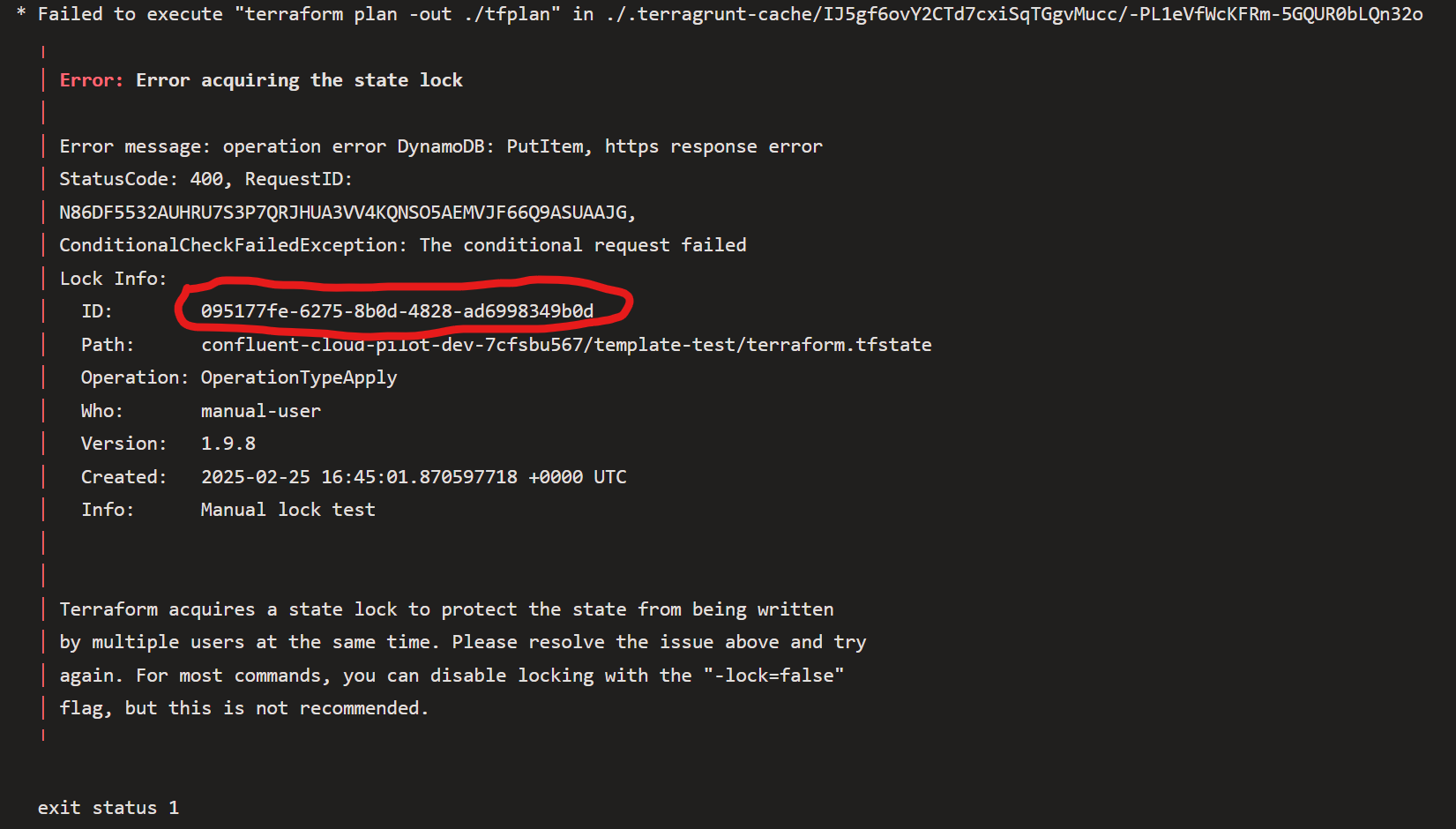
When running the pipeline, you may encounter an error similar to the below during the plan stage:
Why Does This Happen?
- It most likely happened due to interrupting a pipeline during an apply stage, or due to running this pipeline instance simultaneously with another pipeline run that hadn't finished.
- Terraform uses DynamoDB for state locking to prevent multiple users or processes from modifying the state at the same time. This is a protective measure that prevents state corruption.
- If the lock is not released properly (e.g., due to an interrupted pipeline, multiple simultaneously running pipelines, or a manual intervention), future Terraform runs may fail to acquire the lock.
- The error message provides a Lock ID, which uniquely identifies the active lock.
🛠 How to Resolve the Locked State
To unlock the state in the next pipeline run, provide the Lock ID in the pipeline parameters as follows:
1️⃣ Copy the Lock ID
From the error message, find the Lock ID under "Lock Info", as seen in the red circle in the screenshot.
Example from the screenshot (NOTE: DON'T USE THIS EXAMPLE VALUE. USE THE ACTUAL VALUE FROM YOUR PIPELINE OUTPUT ERROR MESSAGE)
ID: 095177fe-6275-8b0d-4828-ad6998349b0d
2️⃣ Provide the Lock ID in the Pipeline Input
Run a new pipeline, but after you click "Run pipeline", modify the pipeline’s environmentData parameter and set the optionalLockID only for the affected environment (e.g., dev), before clicking "Run":
Note: REPLACE THE EXAMPLE ID WITH YOUR LOCK ID AS DETAILED IN PREVIOUS STEP
1 2 3 4 5 6 7 8 | |
🏁 Final Checklist Before Unlocking
✔ Confirm no ongoing Terraform apply operations.
✔ Verify no parallel pipeline executions affecting the same state.
✔ Copy the correct Lock ID and update environmentData in the pipeline parameters.
✔ Let the pipeline run to automatically unlock and proceed with the plan stage.
Other Pipeline Run Failures
If the pipeline operation fails, review the logs and error messages to identify the root cause. Check the prerequisites, input variables, and configuration files.
Terraform itself has quite extensive error logging, and majority of issues related to the Terraform steps can be solved by reading these logs and consulting Terraform Confluent provider documentation: Link, or Confluent documentation for schemas and topics.
For any additional help or troubleshooting needs, please reach out to the KaaS platform team.
Change Log
| Version no. | CHG no. | Approved Pull Request | Date | Change Description |
|---|---|---|---|---|
| 1.0 | CHG0100614 | PR102215 | See PR | Initial Document |
| 2.0 | CHG0100614 | PR107662 | See PR | Updated details related to initial setup and IAMusers |
| 3.0 | CHG0100614 | PR109428 | See PR | Updated details related to initial setup and topic&schemas configurations |
| 4.0 | CHG0122187 | PR135330 | See PR | Application Template enhancements |
| 5.0 | CHG0122187 | PR136999 | See PR | updated configuration folder name for better usability (minor) |
| 6.0 | CHG0159095 | PR180463 | See PR | Update to AWS credentials, as part of service connection implementation and moving docs to kaas-assets-template |
| 7.0 | CHG0178587 | PR215606 | See PR | Release 1+2 |
| 8.0 | CHG0178587 | PR216643 | See PR | Release 1+2, typo in docs |
| 9.0 | CHG0209137 | PR262642 | See PR | Release 3 |