MuleSoft Producer & Consumer Connector and Confluent Schema Registry Setup with Kafka OAuth
This guide explains how to configure Mule Kafka producers and consumers that authenticate to Confluent Cloud with OAuth (OAUTHBEARER) and publish/consume messages validated against the Confluent Schema Registry (also using OAuth).
Replace every
<placeholder>below with values from your own Confluent Cloud environment and identity provider.
Prerequisites
Before proceeding, ensure you have completed the following:
- Azure AD App Registration - Follow the OAuth Client Identity Pools guide to create an enterprise app registration
- API Permissions - Ensure your app registration has
ServicePrincipal.Authenticatepermission on thekaas-oauthresource - MuleSoft Runtime - MuleSoft 4.x runtime with Kafka connector support
- Kafka Bootstrap URL - The cluster bootstrap URL from Confluent Cloud UI
OAuth attribute rules (applies to producer and consumer)
| Value | Where to find it | Example | Format Notes |
|---|---|---|---|
| Bootstrap server | Cluster → Cluster settings | pkc-zd997.eu-central-1.aws.confluent.cloud:9092 |
MUST include :9092 port — this is critical! |
| Schema Registry URL | Environment → Schema Registry → API endpoint | https://psrc-xxxxx.<region>.<cloud>.confluent.cloud |
Uses HTTPS protocol |
| SR logical cluster ID | Environment → Schema Registry → Settings | lsrc-xxxxx |
From Schema Registry settings |
| OAuth client id / secret | Your identity provider (e.g. Azure AD app registration) | <oauth-client-id> / <oauth-client-secret> |
Keep secrets secure in ${secure:...} |
| OAuth token endpoint | Identity provider (Azure Entra ID) | https://login.microsoftonline.com/<tenant>/oauth2/v2.0/token |
Microsoft Entra endpoint |
| OAuth scope | Identity provider / API exposed scope | api://af713fe2-aab8-4437-8db5-47df799d134b/.default |
KaaS OAuth resource app scope |
| Broker audience | Confluent OAuth/OIDC integration | pkc-zd997.eu-central-1.aws.confluent.cloud:9092 |
Same as bootstrap server |
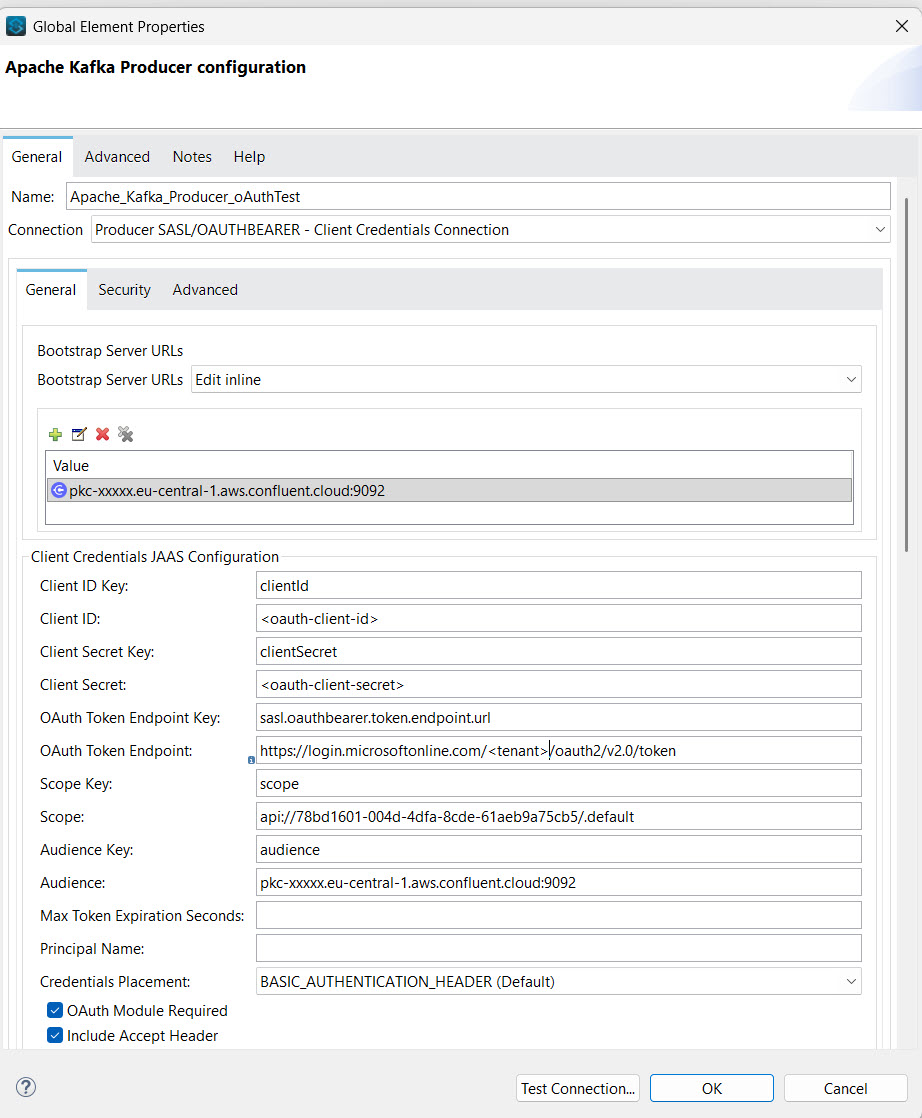
Producer configuration
Add a kafka:producer-config that uses producer-sasl-oauth-bearer-cc-connection.
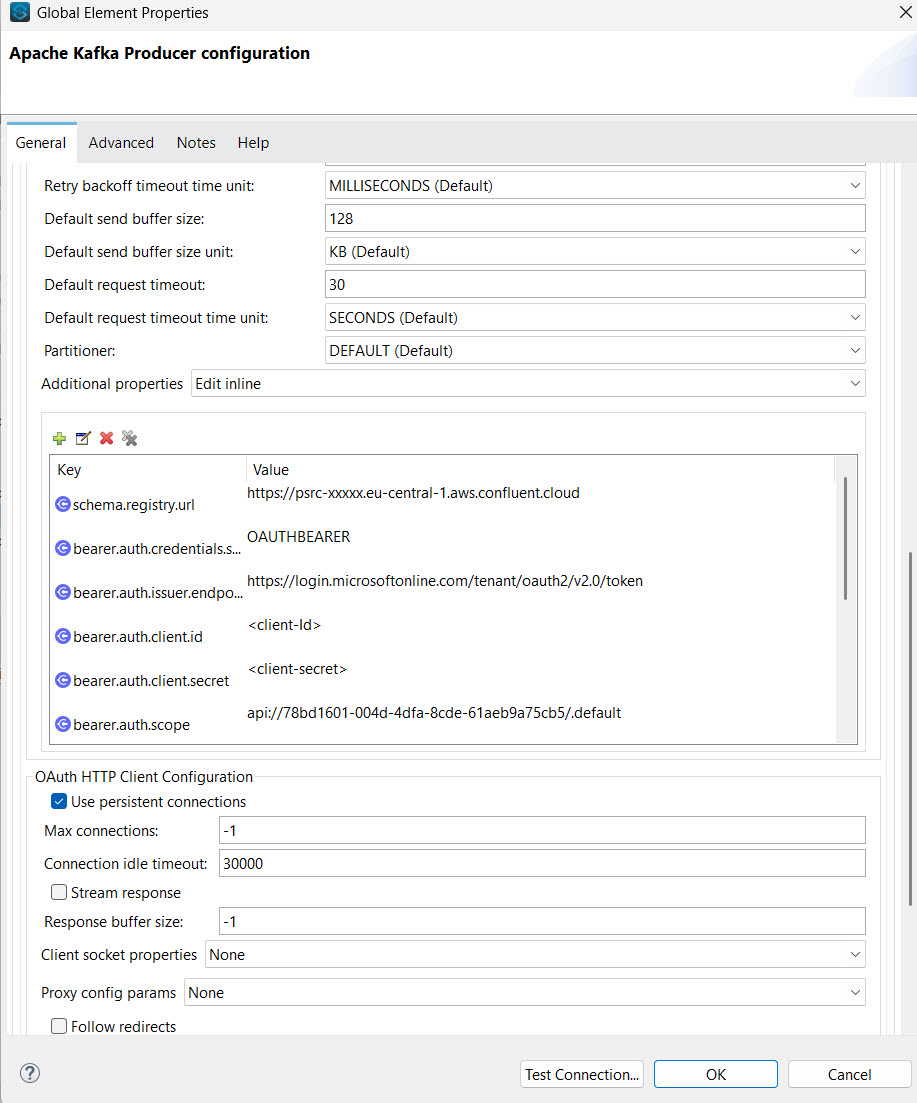
The broker OAuth attributes go on the connection element; the schema registry
OAuth properties go inside <kafka:additional-properties>.
Visual Configuration Reference (MuleSoft Studio):
XML Configuration:
1 2 3 4 5 6 7 8 9 10 11 12 13 14 15 16 17 18 19 20 21 22 23 24 25 26 27 28 29 30 31 32 33 34 35 36 37 38 | |
Note: The schema registry configuration shown above uses Avro serialization. You can use the same OAuth authentication approach for JSON and Protobuf formats by replacing the serializer and related properties.
The OAuth bearer authentication properties (
bearer.auth.*andschema.registry.url) remain the same across all formats.
Consumer configuration (OAuth)
A consumer uses the matching kafka:consumer-sasl-oauth-bearer-cc-connection. The OAuth
attributes work the same way as the producer.
1 2 3 4 5 6 7 8 9 10 11 12 13 14 15 16 17 18 | |
Consuming Avro (optional)
To deserialize Avro from the Schema Registry, add <kafka:additional-properties> with
the registry OAuth settings and the Avro deserializer:
1 2 3 4 5 6 7 8 9 10 | |
Note: The schema registry configuration shown above uses Avro deserialization. You can use the same OAuth authentication approach for JSON and Protobuf formats by replacing the deserializer and related properties
The OAuth bearer authentication properties (
bearer.auth.*andschema.registry.url) remain the same across all formats.
Consumer Configuration Reference
The screenshots below show how these properties map to the MuleSoft Studio visual configuration for consumers:
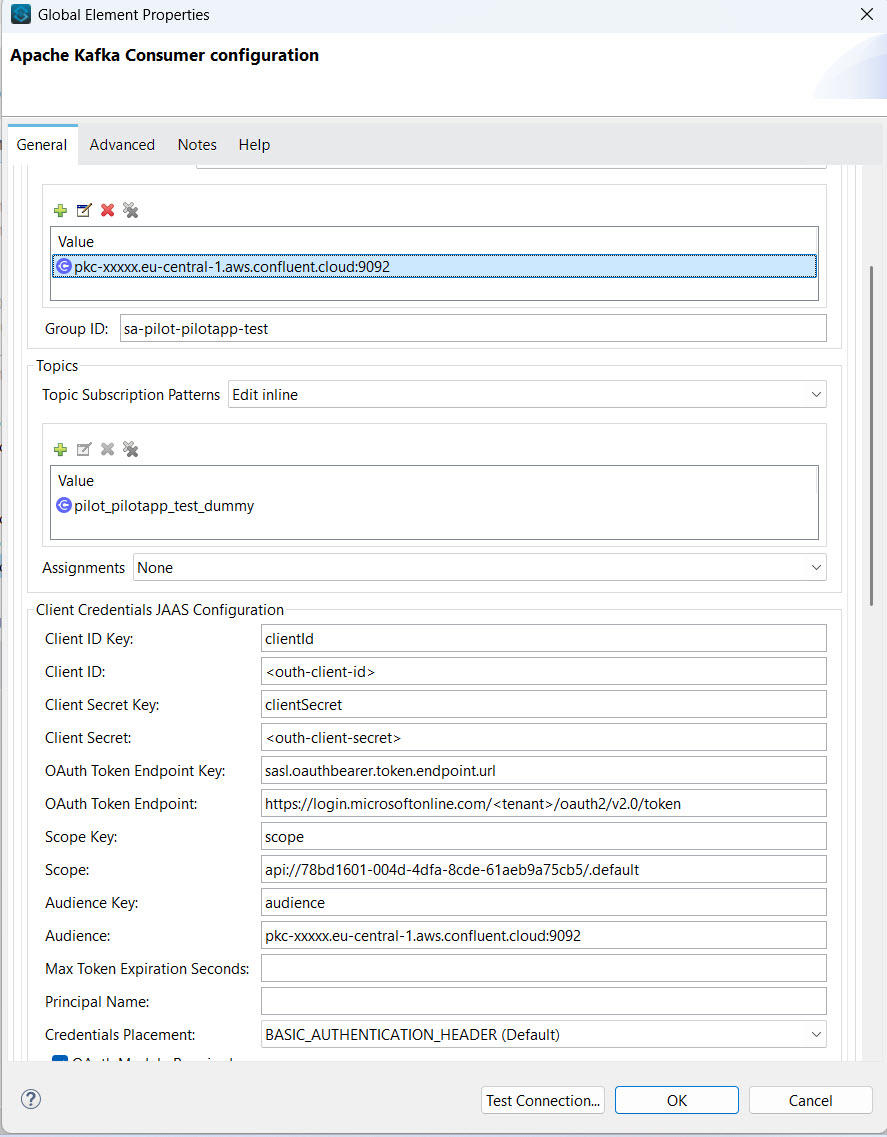 MuleSoft Studio - Kafka Consumer Configuration with OAuth settings
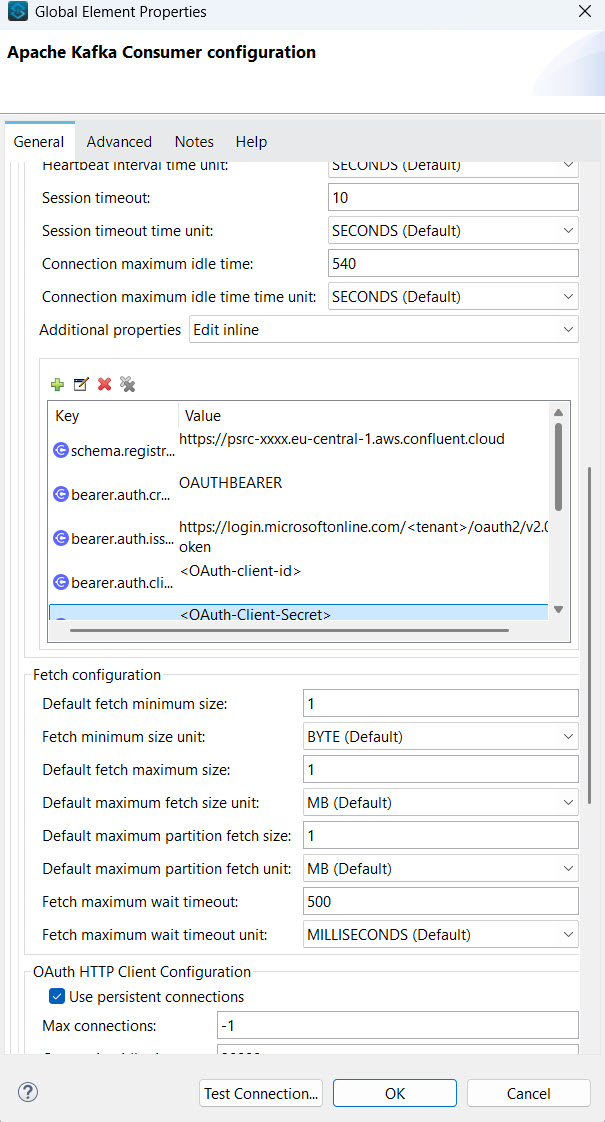 MuleSoft Studio - Advanced Configuration with Schema Registry OAuth properties
Property reference
| Property | Purpose |
|---|---|
schema.registry.url |
Confluent Cloud Schema Registry endpoint |
bearer.auth.credentials.source=OAUTHBEARER |
Tells the SR client to use OAuth |
bearer.auth.issuer.endpoint.url |
OAuth token endpoint used by the SR client |
bearer.auth.client.id / client.secret |
OAuth credentials for SR |
bearer.auth.scope |
OAuth scope for SR |
bearer.auth.logical.cluster |
SR logical cluster id (lsrc-...) — required for Confluent Cloud |
value.subject.name.strategy |
TopicNameStrategy → subject = <topic>-value |
value.serializer |
MuleKafkaAvroSerializer — Mule's Avro serializer wrapper |
auto.register.schemas |
true registers schema on first publish; false requires it to be pre-registered |
Security: move
clientSecretandbearer.auth.client.secretto property files (e.g.${kafka.oauth.clientSecret}) or the Secure Properties module. Do not commit real secrets to source control.
Using Postman or cURL
Test the OAuth token endpoint directly:
1 2 3 4 5 6 | |
Resources
- Using Anypoint Studio to Configure Apache Kafka | MuleSoft Documentation
- OAuth Client Identity Pools - Prerequisites for setting up Azure AD app registration